


On this page
Read summarized version with
An ecommerce growth strategy for a small store is a plan that fixes things in the right order. First, make the store convert the visitors it already gets. Then build traffic you can repeat, raise order value and repeat purchases, and scale what works before your busiest season. Spread over 12 months, that gives you one focus and one number to watch each quarter.
This plan is for stores on Shopify, WooCommerce or any other platform, run by a small team without a marketing department. Every benchmark below names its source and year. Every other figure is a labeled worked example, not an average.
Key takeaways
Grow in this order: conversion, then traffic, then order value and repeat purchases, then scale. Paying for traffic to a store that does not convert wastes the budget.
Judge each quarter by one key performance indicator (KPI): conversion rate, cost per new customer, repeat purchase rate, then profit per order.
Littledata's October 2026 benchmark of 436 Shopify stores puts the median conversion rate at 1.4%, with the top 20% of stores above 2.7%.
Contentsquare's 2026 benchmark of more than 6,500 websites in 9 industries found conversion rates down 5.1% in a year, while average order value rose 6%.
Time the plan so the fourth quarter lands on your peak season, and price out every discount before you run it.
What is an ecommerce growth strategy?
An ecommerce growth strategy is a written plan for which part of your revenue you grow next, how, and how you will know it worked. It is wider than a marketing plan. Marketing brings people to the store; a growth strategy also covers what happens after they arrive.
Store revenue comes from four levers. Each one needs its own work and has its own number. The table shows them side by side.
| Lever | What it means | Number to watch |
|---|---|---|
| Traffic | People who visit your store | Sessions, and the cost of each new customer |
| Conversion | The share of visits that end in an order | Conversion rate |
| Order value | How much each order is worth | Average order value (AOV) |
| Repeat purchases | How often customers come back to buy again | Repeat purchase rate |
Monthly sales are roughly sessions times conversion rate times AOV. Repeat customers add to all three: they come back as new sessions, and they already trust you. Our guide to ecommerce KPIs gives the formula for each of these numbers.
Why the order of the work matters
The levers multiply, so a weak one holds back the rest. This worked example is not a benchmark. A store gets 5,000 sessions a month, converts 1.4% of them and has an AOV of $50. That is 70 orders and $3,500 in monthly sales.
The table shows what each change does to the same store.
| Change | Sessions | Conversion rate | AOV | Monthly sales |
|---|---|---|---|---|
| Starting point | 5,000 | 1.4% | $50 | $3,500 |
| Double the traffic | 10,000 | 1.4% | $50 | $7,000 |
| Raise conversion | 5,000 | 2.1% | $50 | $5,250 |
| Raise AOV | 5,000 | 1.4% | $60 | $4,200 |
| Raise conversion and AOV | 5,000 | 2.1% | $60 | $6,300 |
Doubling traffic looks best on paper, but you pay for paid visits again every month, and free traffic takes months to build. A better conversion rate and a higher AOV keep paying on every future visit, including the visits you buy later. That is why this plan fixes the store before it spends on visitors.
The 12-month plan at a glance
The plan splits the year into four quarters, each with one focus and one KPI. Start it so the fourth quarter ends with your busiest season. For many stores that means November and December, so the plan starts in January. The table shows the whole year.
| Quarter | Focus | Main work | KPI to judge it by |
|---|---|---|---|
| Quarter 1 (months 1-3) | Make the store convert | Product pages, trust, checkout costs, page speed, fast replies, tracking | Conversion rate |
| Quarter 2 (months 4-6) | Build traffic you can repeat | SEO, an email or WhatsApp list, customer content, small paid tests | Cost per new customer |
| Quarter 3 (months 7-9) | Raise order value and repeat purchases | Free shipping threshold, bundles, after-purchase messages, reviews | Repeat purchase rate |
| Quarter 4 (months 10-12) | Run peak season and scale what worked | Sale calendar, priced-out offers, stock, more budget on proven channels | Profit per order |
One KPI per quarter does not mean you ignore the others. You judge that quarter's work by its KPI, and you check the rest weekly so nothing breaks while your attention is elsewhere.
End each quarter with a short review: what moved the KPI, what did not, and what to stop. Keep a one-page log of every change with its date. Without it, you cannot tell in month 9 which change in month 2 did the work.
How do you set a baseline before you start?
Record four weeks of numbers before you change anything. You need sessions, conversion rate, average order value, orders from new and returning customers, and what you spent on marketing. Without a baseline, you cannot tell whether the plan is working or the season changed.
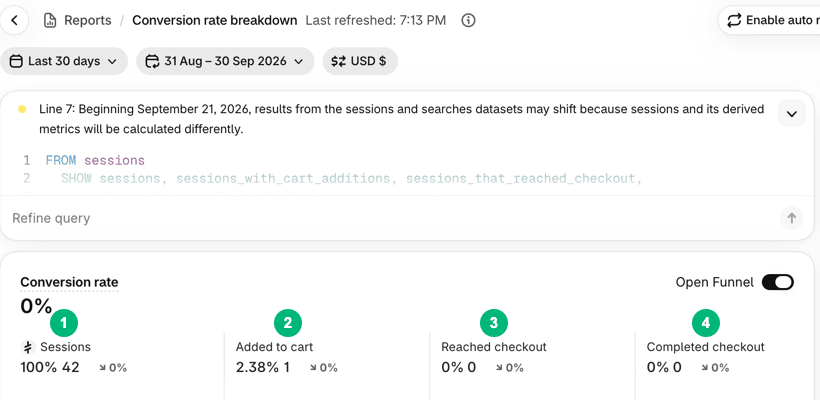
Your platform already reports most of these. In Shopify, the Conversion rate breakdown report splits sessions into four steps, from all sessions to sessions that completed checkout. Shopify defines conversion rate as "the percentage of sessions that resulted in a purchase", in its help page on behavior reports.
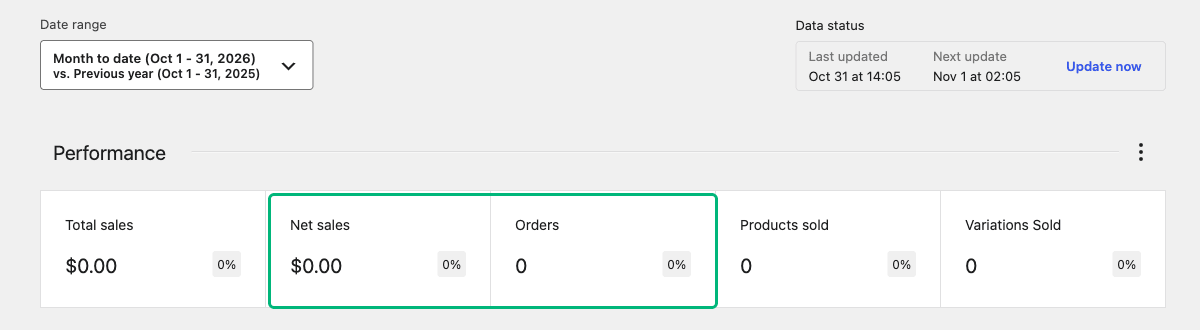
In WooCommerce, the Analytics dashboard opens with Performance indicators such as net sales and orders. Average order value is one you can switch on from the section's menu, and WooCommerce calculates it as net sales divided by orders. The WooCommerce Analytics guide lists each indicator. For sessions and conversion rate on WooCommerce, you can add Google Analytics 4 (GA4) and its ecommerce events, such as add to cart and purchase.
The numbers to track, and what a weak one means
The table lists the KPIs this plan uses, how to calculate each, and the usual cause when one is low. Read it as a set of first guesses to test, not as a diagnosis.
| KPI | How to calculate it | Quarter | What a weak number usually means |
|---|---|---|---|
| Conversion rate | Sessions that end in an order divided by all sessions | 1 | Product pages, price, trust or checkout put visitors off |
| Add-to-cart rate | Sessions with a cart addition divided by all sessions | 1 | The product page does not convince |
| Cost per new customer | Marketing spend divided by new customers in the same period | 2 | The channel, the audience or the offer does not fit |
| Average order value (AOV) | Net sales divided by orders | 3 | Customers buy one item and have no reason to add another |
| Repeat purchase rate | Customers with two or more orders divided by all customers, over 90 days or more | 3 | Weak after-purchase experience, or nothing to come back for |
| Profit per order | Order revenue minus product cost, shipping, payment fees, discount and ad spend per order | 4 | Discounts or ads eat the margin |
How does your conversion rate compare?
Compare your conversion rate with a benchmark only after you have your own baseline. In Littledata's October 2026 benchmark of 436 Shopify stores, the median conversion rate is 1.4%. The top 20% of stores convert above 2.7%, and the bottom 20% at 0.5% or less. Littledata counts the share of sessions with at least one purchase, using Google Analytics 4 data over 90 days. All 436 stores use Littledata, so they are not a random sample of Shopify.
Your industry and your traffic mix move that number a lot. In the same Littledata data, beauty and skincare stores (39 stores) have a median of 2.5%. Fashion and apparel (76 stores) and home and furniture (63 stores) sit at 1.0%. For more detail, see these conversion rate benchmarks by industry and device.
Treat any benchmark as context. Contentsquare's 2026 benchmark report gives the same advice: use benchmarks "as context, not goals". The number that matters most is your own, compared with your own baseline.
Quarter 1: how do you make the store ready to convert?
Fix what stops a visitor who is already on your store from buying. That means unclear product pages, missing trust signals, surprise costs, a slow site and slow answers. Spend little on traffic in these three months. Every fix here makes the traffic you buy later cheaper.
Work through the store in the order a customer meets it. Start with your 10 best-selling product pages, because they carry the most sales.
Make product pages answer the buying questions
A product page has to answer what the customer would ask in a real store. What is it, will it fit, what is it made of, when will it arrive, and can I return it? If the page does not answer, the visitor leaves or sends a message and waits.
Show the product in use and at real size, not only on a white background. Lead the description with the main benefit, then the facts: size, material, care and what is in the box. These product description examples by product type show how the order changes for clothing, beauty, electronics and home products.
Put trust next to the buy button
A new store has no reputation, so the page has to supply it. Show reviews and customer photos near the price. Put a one-line returns promise and your delivery time right under the add-to-cart button.
Use only real reviews, and show the low ones too. Fake reviews mislead customers, and the US Federal Trade Commission's 2024 rule bans them, including buying and selling them. Our guide to social proof for online stores covers what to show and where.
Remove surprise costs and checkout steps
Extra costs top the list of reasons customers give for leaving a cart. In Baymard Institute's cart abandonment research, updated September 2025, 42% of people in the US who shop online and had abandoned a cart said they were just browsing. Ignoring that group, the top reason was extra costs such as shipping, tax and fees, at 40%.
Show the shipping cost, or your free shipping threshold, on the product page and in the cart. Then cut the checkout to what you need. Baymard's checkout benchmark finds that the average US checkout shows 23.48 form elements by default. Its usability testing shows an ideal flow can be as short as 12-14. Offer guest checkout, and remove optional fields you never use.
Make the store fast on phones
Test speed on a phone first, because a store that loads fast on your laptop can still load slowly on a phone. Google's guidance on Largest Contentful Paint says a good value is 2.5 seconds or less, measured at the 75th percentile of page loads. That is how long the main image or text block takes to appear.
Test your home page and your top product page in PageSpeed Insights. The usual fixes are smaller images, fewer apps or plugins, and a lighter theme. Remove anything you installed and stopped using; each one can add code to every page.
Answer questions within hours
A customer who asks a question is still thinking about buying. Give them one fast channel, such as WhatsApp, live chat or email, and answer within a few hours during your working day. Show that channel on product pages and in the cart.
Turn repeated questions into page content. If five customers ask about sizing, the size guide belongs on the product page. For setup, consent rules and message types, read our guide to WhatsApp for e-commerce.
How to judge quarter 1
Compare your conversion rate in month 3 with your baseline, and check the add-to-cart rate and checkout completion separately. If add-to-cart rose but completed checkouts did not, the problem has moved to the cart or the checkout. Fix that before quarter 2 starts.
Quarter 2: where should a small store get its traffic?
Get traffic from channels you can repeat and partly own: search, your own email or WhatsApp list, and social content from your customers. Add small paid tests to learn which products and messages sell. Judge the quarter by your cost per new customer, not by visits.
Traffic is getting harder to win. Contentsquare's 2026 benchmark found that visits to the websites in its data fell 3.8% in a year. Brands are leaning more on paid channels, "pushing acquisition costs higher", the report says. A channel you own is worth more each year that trend continues.
Start SEO now, because it is slow
Search traffic takes months, so it belongs early in the year. Google's SEO Starter Guide says some changes take effect in a few hours and others take several months. It suggests waiting a few weeks before you judge a change.
Start with the pages that sell. Write clear product and collection titles, use readable URLs, and add unique descriptions instead of the manufacturer's text. Then publish a few buying guides that answer what customers ask before they buy. Our ecommerce SEO checklist covers the full task list for Shopify and WooCommerce.
Build a list you own
An email or WhatsApp list is an audience you do not rent. Ask for a signup on every page with a clear reason: a first-order discount, early access to new products or a useful guide. Send something within minutes of signup, while interest is high.
Message only people who agreed to hear from you, and make unsubscribing easy. Consent rules differ by country and by channel, so check the current rules for yours.
Post content your customers make
Customer photos and videos show real people using the product, which your own product shots cannot do. Ask customers for photos in your after-purchase messages. Repost them with permission on social media and on product pages.
Test paid ads with a cap
Run paid ads as tests, with a budget you can afford to lose. This worked example is not a benchmark. You spend $600 in a month on one ad channel and get 15 new customers. Your cost per new customer is $40.
If a first order earns you $18 after product, shipping and fees, each new customer loses you $22 at first. That can still work, but only if customers come back. Quarter 3 is where you find out. Until then, stop any channel whose cost per new customer stays far above what a first order earns.
Test one product and one message at a time for two to four weeks. Keep what brings customers at a cost you can carry, and drop the rest.
Quarter 3: how do you raise order value and repeat purchases?
Give customers a reason to add one more item now and a reason to come back later. Judge the quarter by your repeat purchase rate, and watch AOV next to it. Both grow profit without paying again for the same visitor.
Keeping customers is getting more valuable. Contentsquare's 2026 benchmark found that average order values rose 6% in a year while conversion rates fell. It also found that 13% of visitors return within 30 days, and that on many sites these returning visitors account for most traffic, engagement and conversions. The report adds that returning visitors convert at higher rates than new ones.
Raise the value of each order
Set a free shipping threshold a little above your current AOV. With a $50 AOV, a threshold of $60 gives many customers a reason to add one item. Check that the extra margin covers the shipping you now pay.
Bundle products that customers already buy together. Your order history shows the common pairs.
Offer one relevant add-on in the cart, such as a case with a phone accessory or a refill with a starter kit. One good suggestion works better than a long list.
For products people use up, offer a lower price per unit on two or three.
Bring customers back
Shopify counts a returning customer as "a customer who placed an order, and whose order history already includes at least one order", per its help page on customer reports. Your job is to make that second order more likely.
- Send a delivery update, then a short message on how to use or care for the product.
- Ask for a review and a photo about a week after delivery. Those reviews feed the trust work from quarter 1.
- Send a reminder when the product is likely to run out. For a 30-day supply, remind on day 25.
- Tell past customers first about new products and restocks.
Measure your repeat purchase rate over 90 days or longer. A product bought twice a year needs a longer window than one bought monthly.
Quarter 4: how do you run peak season without giving away margin?
Plan offers at least eight weeks ahead, work out the profit on every discount, and order stock early. Add budget only to channels that hit your cost target in quarter 2. Judge the quarter by profit per order, not by revenue. A busy month at a loss is still a loss.
Price out every discount first
A discount takes its whole amount out of your margin, not out of your price. This worked example is not a benchmark. It assumes a $60 product that costs you $24, $6 of shipping you pay, and a 3% payment fee.
| Line | Full price | 20% off |
|---|---|---|
| Price paid | $60.00 | $48.00 |
| Product cost | $24.00 | $24.00 |
| Shipping you pay | $6.00 | $6.00 |
| Payment fee (3%) | $1.80 | $1.44 |
| Profit per order before ads | $28.20 | $16.56 |
At 20% off, profit per order falls by 41%. You need about 70% more orders to earn the same total profit. If your ads also get more expensive in peak season, the gap grows. Our guide to promotional pricing strategies compares other offer types that protect margin, such as gifts and spend thresholds.
Keep sale prices honest
Show a crossed-out original price only if you really sold at that price. In the US, the FTC's guide on former price comparisons sets the test. The former price must be "the actual, bona fide price" offered "on a regular basis for a reasonably substantial period of time". Other countries have their own rules, so check the current rules for yours.
On Shopify, the crossed-out price is the compare-at price.
Plan the calendar and the stock
List your peak dates 8-12 weeks ahead. For many stores selling in the US and Europe, that means Black Friday, Cyber Monday and the last shipping dates before the holidays. For each date, decide the offer, the stock you need, the emails you will send and who answers customer questions.
Selling in the Gulf follows a different calendar. Ramadan and Eid follow the lunar Islamic calendar, so their dates move earlier each year. Look up the dates for your year, then plan stock, couriers and staff around them instead of around Black Friday.
Scale only what worked
Put extra budget into channels whose cost per new customer stayed under your target in quarters 2 and 3. Do not start a new channel in peak season, when ad prices are high and you have no time to learn.
After the season, run a full-year review. Compare each KPI with your starting baseline, keep the changes that worked, and set next year's baseline from the new numbers.
Which apps and tools does a small store need?
Fewer than most stores install. You need one tool for each job in the plan: analytics, email or messaging, reviews, a signup form, and a way to schedule sales. Your platform covers some of these already. Add an app only when you can name the KPI it should move.
Each app or plugin can add code to your pages and a monthly bill. Add one at a time, test page speed after each, and remove what you do not use. Our list of Shopify apps for a new store, by job, covers each category with what to skip.
If you have not chosen a platform yet, read Shopify vs WooCommerce compared on cost, fees and upkeep first. Grovlix, the publisher of this blog, makes apps for online stores. They run on Salla and Zid, and InstaFeed also runs on WooCommerce and on any website. Our Shopify apps are in progress, and none is listed on the Shopify App Store yet.
What usually goes wrong with a growth plan?
Most plans fail because the store spends on the wrong lever at the wrong time, not because of a bad channel. These are the mistakes that show up most often, and the fix for each.
Buying ads before the store converts. You pay for visits that leave. Fix quarter 1 first.
Posting content with no goal. Every post should point to a product, a list signup or an answer to a buying question.
Answering questions slowly. A customer who waits a day may buy elsewhere.
Counting visits instead of orders and profit. Traffic that does not buy only costs you.
Changing many things at once. When five things change in one week, you cannot tell which one worked.
Running a sale every month. Customers learn to wait for the next one, and full-price sales drop.
If you are halfway through the year and a KPI has not moved, go back one stage. Weak repeat purchases often trace back to a weak first experience, such as a slow delivery or a product that did not match the page.
Find out where your conversion rate stands
The plan starts with one number: your conversion rate. Compare yours with current benchmarks by industry and device before you choose what to fix first in quarter 1.
Frequently asked questions
What is the difference between a growth strategy and a marketing strategy?
A marketing strategy decides how you bring people to the store and what you tell them. A growth strategy is wider: it also covers conversion, order value, repeat purchases and profit. A store can run good marketing and still shrink, if the visitors it pays for do not buy or never come back. The growth plan decides which lever to work on first.
How much should a small online store spend on marketing?
There is no single right figure. Set your budget from your numbers: what a first order earns you after product, shipping and fees, and how often customers come back. Start with a test budget you can afford to lose, and track the cost of each new customer. Raise spending only on channels that bring customers in for less than they earn you.
How long does it take to grow an online store?
Plan in quarters, not weeks. Fixes to product pages and checkout show in your conversion rate first, because they work on visitors you already have. Search traffic is slower: Google says some changes take effect in a few hours and others take several months. Repeat purchases need at least one full buying cycle of your product before you can measure them.
Should a new store run paid ads from day one?
Only small tests. In the first months, ads tell you which products and messages sell, which is useful. Large budgets before the store converts mostly pay for visits that leave. Fix product pages, trust signals and checkout first, keep paid tests to a budget you can lose, and scale spending once you know your cost per new customer.
Which numbers should a small store check every week?
Check five: sessions, conversion rate, average order value, orders from returning customers, and marketing spend. Together they show whether traffic, the store or the offer is the problem. Look at the same weekday range each week and compare with the same weeks last month. Write down any change you made that week, so you can link causes to results.
Amira Saad is a SaaS and AI product designer at Grovlix, where she works on the UX, UI and conversion rate optimization of PopupSnap, InstaFeed and PopAutomate. She writes about what makes online stores convert, from product pages to social proof.