


On this page
Read summarized version with
Shopify vs WooCommerce comes down to how much of the store you want to run yourself. Choose Shopify if you want one monthly bill and a store you can run without managing a server. Choose WooCommerce if you want full control of your code and data on WordPress, and you or a developer can look after hosting and updates. The better choice depends on your budget, your team and the markets you sell in.
This guide compares the two on cost, fees per sale, setup, apps, SEO, languages including Arabic, and limits. Every price and fee comes from the platforms' official pages as of October 31, 2026.
Grovlix, the publisher of this blog, makes apps for online stores; today they run on Salla, Zid, WooCommerce and any website.
Key takeaways
Shopify's plans start at $29 a month paid yearly or $39 paid monthly (US prices, October 2026). Plus starts at $2,300 a month on a 1-year or 3-year term.
WooCommerce is a free WordPress plugin, but you pay for hosting, a domain and any paid extensions.
With a third-party payment provider, Shopify adds a fee of 2% on Basic, down to 0.2% on Plus. WooCommerce adds no platform fee.
Both can sell in Arabic. On Shopify, the latest Horizon themes support right-to-left text. On WooCommerce, it depends on your WordPress theme.
Shopify Payments works in the UAE but not in Saudi Arabia. WooPayments works in the UAE but not in Saudi Arabia either.
Shopify vs WooCommerce at a glance
Shopify is a hosted platform you rent by the month. WooCommerce is free software you install on a WordPress site you host yourself. Most other differences follow from that one. The table puts the main facts side by side.
| Shopify | WooCommerce | |
|---|---|---|
| What it is | Hosted commerce platform, paid monthly | Free, open-source plugin for WordPress |
| Monthly cost | Basic $29 (yearly) or $39 (monthly); Plus from $2,300 on a 1-year or 3-year term | Plugin is free; hosting, domain and paid extensions extra |
| Hosting and security | Hosting, SSL certificate and unlimited bandwidth included | You choose and pay for hosting; HTTPS recommended |
| Built-in payments | Shopify Payments, in 41 countries | WooPayments, in 38 countries |
| Standard US card rate, built-in payments | From 2.9% + $0.30 online (Basic) | 2.9% + $0.30 |
| Extra fee with another payment provider | 2% (Basic) to 0.2% (Plus) | None from WooCommerce |
| Apps and extensions | Shopify App Store ("1000s of apps") | WooCommerce Marketplace ("hundreds" of extensions) plus WordPress plugins |
| SEO basics | Sitemap generated automatically | WordPress core and SEO plugins; product URL base can be changed |
| Arabic and right-to-left | Up to 20 languages (30 on Plus); Horizon themes support RTL | Translated into 73 languages including Arabic; RTL depends on the theme |
| Product variants | Up to 2,048 per product, 3 options | No platform cap listed; limited by hosting and plugins |
| Who maintains it | Shopify runs the platform; you manage apps and theme | You or your developer update WordPress, the theme and plugins |
Sources: Shopify pricing, the WooCommerce plugin page on WordPress.org and the WooPayments fee schedule, all read October 31, 2026.
How much does each platform cost per month?
Shopify costs $29 to $299 a month on its standard plans when you pay yearly, and Plus starts at $2,300. WooCommerce has no subscription, but a store still costs money each month. Hosting is the main cost, plus any paid extensions. The two are hard to compare on price alone because you buy different things.
Shopify plans
Shopify lists four plans. Paying yearly lowers the monthly price on Basic, Grow and Advanced. These are the US prices on shopify.com/pricing.
| Plan | Paid yearly | Paid monthly | Standard online card rate (Shopify Payments) | Additional staff accounts |
|---|---|---|---|---|
| Basic | $29/mo | $39/mo | 2.9% + $0.30 | None listed |
| Grow | $79/mo | $105/mo | 2.7% + $0.30 | 5 |
| Advanced | $299/mo | $399/mo | 2.5% + $0.30 | 15 |
Plus starts at $2,300 a month on a 1-year or 3-year term. It has unlimited staff accounts and a 2.25% + $0.30 standard online card rate.
Premium cards cost more: 3.5% + $0.30 on Basic, 3.3% on Grow, 3.1% on Advanced and 2.95% on Plus. Cards from other countries add 1% on every plan.
Shopify offers a 3-day free trial with no credit card. After it, most plans cost $1 a month for the first 3 months (a promotional offer, October 2026). Shopify charges no setup fee. Hosting, a free SSL certificate and unlimited bandwidth are part of every plan. Prices and payment options can differ in other countries, so check the page from where your business is based.
The monthly fee is rarely the whole bill. Paid apps, a paid theme and extra sales channels add their own charges. Add those up before you compare.
WooCommerce costs
The WooCommerce plugin is free. Its WordPress.org page says: "This plugin is free but offers additional paid commercial upgrades or support." What you pay for is everything around it.
Hosting. WooCommerce needs a server with PHP 7.4 or higher and MySQL 5.5.5 or MariaDB 10.1 or higher. WooCommerce recommends a 256 MB memory limit and HTTPS. Shared hosting is cheap but slows down under load. Managed WordPress hosting costs more and handles updates and backups.
A domain name, renewed each year.
A theme. Premium themes are an extra cost.
Extensions. Extensions on the WooCommerce Marketplace list annual prices. For example, Product Add-Ons costs $79 a year on woocommerce.com/products, read October 31, 2026.
Developer time. Someone has to run updates, fix conflicts between plugins and keep backups. If that is not you, it is a cost.
A small WooCommerce store on modest hosting can cost less per month than Shopify Basic. A busy one on managed hosting with several paid extensions can cost more than Shopify Grow. Price both with your real list of features before you decide.
How to compare the real monthly cost
List the features you need first, then price each one on both platforms. A fair comparison has six lines for each platform:
- The platform fee: the Shopify plan, or zero for WooCommerce.
- Hosting: included on Shopify, a separate bill on WooCommerce.
- Apps or extensions for each feature on your list, at their monthly or yearly price.
- Payment fees at your expected monthly sales, from the next section.
- Help: the hours of developer or agency time you expect each month.
- Domain: both platforms need one. Shopify lets you connect a domain you own or buy one.
Add the six lines for a year, not a month. Yearly extension licenses and yearly Shopify billing both hide in a monthly view.
What do you pay on each sale?
On Shopify with Shopify Payments, you pay a card rate and no separate transaction fee: from 2.9% + $0.30 online on Basic down to 2.25% + $0.30 on Plus. On WooCommerce, you pay only your payment provider's fee, because WooCommerce takes no cut. The difference shows when you use a payment provider other than the platform's own.
Shopify: card rates and the third-party fee
Shopify Payments has no separate transaction fee. If you use a different provider, such as a local gateway, Shopify adds a third-party transaction fee on top of that provider's charge. The fee is 2% on Basic, 1% on Grow, 0.6% on Advanced and 0.2% on Plus.
Online cards from other countries cost an extra 1% on every plan. Shopify Payments is available in 41 countries, including the US, the UK and the UAE. Saudi Arabia is not on Shopify's list of supported countries. A store based there uses a third-party provider and pays the third-party fee for its plan.
WooCommerce: provider fees only
WooCommerce's own payment service, WooPayments, has no setup cost or monthly fee. In the US, a card payment costs 2.9% + $0.30. Cards from another country add 1.5%, and payments in a currency that does not match your payout account add 1%. A dispute costs $15.
WooPayments works in 38 countries. In the UAE, a card payment costs 2.9% + AED 1 (about $0.27 at October 2026 rates), and only business accounts can sign up. Saudi Arabia is not supported. Woo stores can also use other gateways through extensions, with no fee from WooCommerce on top.
A worked example
Say you sell $10,000 a month online through a local gateway that charges its own fee, not through Shopify Payments. The table shows the platform fee only. Your gateway's own fee comes on top in every row.
| Platform | Platform fee on $10,000 |
|---|---|
| Shopify Basic | $200 (2%) |
| Shopify Grow | $100 (1%) |
| Shopify Advanced | $60 (0.6%) |
| Shopify Plus | $20 (0.2%) |
| WooCommerce | $0 |
If your country supports Shopify Payments and you use it, the Shopify fee drops to $0 and only the card rate applies.
Which is easier to set up and run?
Shopify is easier to set up and to keep running. You sign up, pick a theme and add products, all in the browser. Shopify runs the servers, security and software updates. WooCommerce takes more setup and more upkeep, and in return you control every part of the store.
On Shopify, your work is the store itself: products, theme settings, apps and orders. You never update the platform. According to Shopify's pricing FAQ, Shopify is certified Level 1 PCI DSS compliant, and stores powered by Shopify are PCI compliant by default.
On WooCommerce, you or your host install WordPress, then the plugin, then a theme. After that, someone must keep WordPress, WooCommerce, the theme and every plugin up to date. Updates matter for security, and a plugin update can conflict with another plugin. Good hosts help with backups and staging sites. Many stores pay a developer or agency for this upkeep.
Choose by who will run the store day to day:
One person with no technical help: Shopify.
A team with a WordPress developer, or an agency on call: either works, and WooCommerce gives that developer more freedom.
An existing WordPress site with traffic: WooCommerce adds a store without moving your site.
Who owns your store data?
You own your data on both platforms, but you hold it in different ways. On WooCommerce, everything sits in your own WordPress database on your own hosting. The plugin's WordPress.org page puts it plainly: "you're free to export all your content and take your site to any platform you choose".
On Shopify, your data lives on Shopify's servers and you export it when you need it. Products export as a CSV file from the Shopify admin, according to the Shopify Help Center. Large exports arrive by email. Product images are not included in that file, so plan for them separately if you ever move.
In practice, this matters most on the day you leave. Moving away from either platform means rebuilding your theme and replacing apps or plugins. Keep a regular export of products, customers and orders whichever platform you pick.
Which platform has better apps and extensions?
Shopify and WooCommerce both have large app ecosystems, and most common jobs are covered on each. Shopify's pricing page says you can "integrate with 1000s of apps" from the Shopify App Store. WooCommerce has "hundreds of free and paid extensions" on its Marketplace, and as a WordPress plugin it also works with general WordPress plugins.
The difference is in how they install and what they can change.
Shopify apps connect through Shopify's APIs and add blocks to your theme. They are easy to install and remove. They can only change what Shopify allows: checkout customization is "Limited" on Basic, Grow and Advanced and "Full" on Plus.
WooCommerce extensions run as code on your own server. They can change almost anything, including checkout. The cost is that each one adds code you must keep updated and test.
Pricing differs too. Extensions on the WooCommerce Marketplace list annual prices. Check each Shopify app's listing for its billing period.
Check that the apps you need exist on the platform you pick. For example, Grovlix's InstaFeed by PopupSnap runs on WooCommerce today and is not available on Shopify yet; see what runs on Shopify today.
Which is better for SEO?
Neither Shopify nor WooCommerce wins on SEO by itself. Both let you set page titles, meta descriptions, image alt text and clean URLs, and both can rank well. What ranks a store is its content, its speed and the links it earns. The platforms differ in how much control you get and how much setup you need.
Shopify handles the basics for you. According to the Shopify Help Center (2026), it generates sitemap files automatically at your domain root, such as example.com/sitemap.xml. They update as you add products, collections, blog posts and pages. Hosting speed is Shopify's job, so most of the speed work is choosing a light theme and few apps.
WooCommerce gives more control. You can set a custom base for product URLs under Settings > Permalinks, as the WooCommerce permalinks guide explains. WordPress also brings a full blogging system, which helps stores that publish a lot of content. Most Woo stores add an SEO plugin for titles, meta and schema. Speed depends on your hosting, theme and plugins, so a cheap host can hold your rankings back.
For the full task list on either platform, see our ecommerce SEO checklist.
Can you sell in Arabic and other right-to-left languages?
Yes, you can sell in Arabic on both Shopify and WooCommerce, but check your theme first. Arabic is written right to left (RTL), so the whole layout has to flip, not only the text. On Shopify, the latest Horizon family themes support RTL. On WooCommerce, RTL support comes from WordPress and your theme.
| Shopify | WooCommerce | |
|---|---|---|
| Languages per store | Up to 20 (Basic, Grow, Advanced); up to 30 (Plus) | No platform limit; multilingual stores usually use a translation plugin |
| Arabic text | Arabic checkout and default theme text translations available | Plugin translated into 73 languages, including Arabic |
| Right-to-left layout | Latest Horizon family themes support RTL; confirm for other themes | WordPress detects RTL languages; layout depends on the theme |
| Built-in payments in the UAE | Shopify Payments available | WooPayments available (business accounts only) |
| Built-in payments in Saudi Arabia | Not available; use a third-party provider | Not available; use a gateway extension |
Sources: Shopify's requirements for selling in multiple languages, the WooCommerce plugin page, and the WooPayments country list, read October 31, 2026.
Shopify's help center says the latest Horizon family themes "support right-to-left languages, such as Arabic, Hebrew, and Urdu". For other themes, confirm RTL support with the developer before you add Arabic. WordPress has detected right-to-left languages since version 3.0, through its is_rtl function, per the WordPress developer reference. A WordPress theme still has to include RTL styles for the layout to flip correctly.
Before you launch an Arabic store, test three pages on a phone with Arabic switched on: a product page, the cart and the checkout. Look for icons pointing the wrong way, mixed Arabic and English text out of order, and prices in the wrong place.
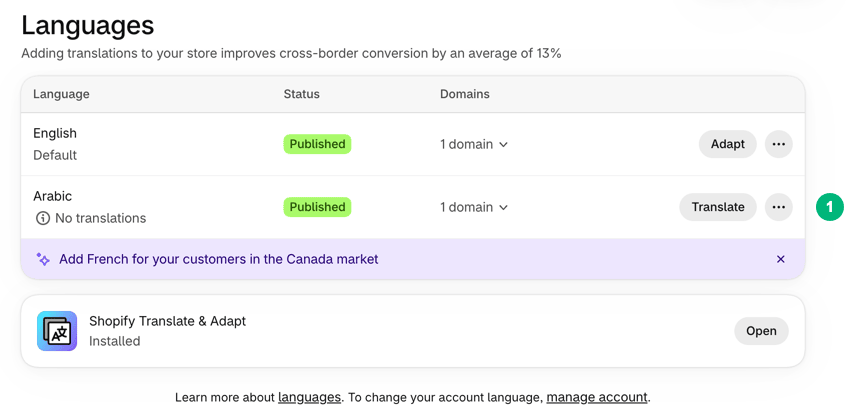
On Shopify, you add Arabic under Settings > Languages and then publish it, per Shopify's guide to managing languages. Publishing adds a store language; it does not translate your products. You add translations with the Translate & Adapt app or a translation app from the Shopify App Store. Without them, a published language shows only Shopify's default translations.
How far can each platform grow with you?
Shopify and WooCommerce both run large stores. Shopify sets clear limits per plan, and you upgrade when you reach them. WooCommerce has fewer fixed limits, but its capacity depends on your hosting and on how well the site is built.
On Shopify, these are the limits that most often matter.
Variants: up to 2,048 variants per product and up to three options, such as size, color and material, per the Shopify Help Center on variants (2026).
Staff: 5 additional staff accounts on Grow, 15 on Advanced and unlimited on Plus.
Inventory locations: 10 on Basic, Grow and Advanced, and 200 on Plus.
Languages: 20 on the standard plans and 30 on Plus.
Shopify Plus, from $2,300 a month on a 1-year or 3-year term, adds fully customizable checkout, unlimited B2B catalogs and higher API limits. That suits brands with high order volumes or complex needs.
On WooCommerce, growth is a hosting and engineering question. A large catalog or a big sale day needs a host that can scale. It also needs caching that does not break the cart, and plugins that stay fast with many products. None of this has a list price. It is the work a good host or developer does for you.
Which should you choose?
Pick the platform that matches who runs the store, where you sell and how much control you need. Most stores fit one of the lists below. If you match items on both, weigh the first item in each list most.
Choose Shopify if
You want to launch fast and run the store without a developer.
You prefer one predictable monthly bill that includes hosting and security.
Shopify Payments works in your country, so you avoid the third-party fee.
You sell on social media, marketplaces or in person and want it all in one admin.
You expect to grow into Plus features such as custom checkout or B2B catalogs.
Choose WooCommerce if
You already have a WordPress site with content and traffic.
You or your team can handle hosting, updates and backups, or you pay someone who can.
You need to change the checkout or store logic in ways Shopify's standard plans do not allow.
You use a local payment gateway and do not want to pay a platform fee on top of it.
You want full ownership of your code and data on a server you control.
If your store is new and you have no developer, start with Shopify. If you already run on WordPress, add WooCommerce before you think about moving. For the wider set of decisions around a launch, read about the basics of e-commerce growth.
What should you add after you choose?
After the platform, the next steps are the same on both: build trust, then run offers on a schedule. A new store has no reviews and no name recognition. A store with traffic needs sales that start and end on time.
Trust first. Reviews, customer photos and clear returns lines answer a new visitor's doubts. Our guide to social proof for online stores covers what to show and where, on both platforms.
Offers on a schedule. Planned sales are easier to run when prices change and revert automatically.
A short list of apps. Add one app per job, test page speed after each, and remove what you do not use. Our list of apps a new Shopify store needs covers each job.
A way to measure. Before you add anything, note your conversion rate and average order value for two weeks. Then you can tell which change helped.
The order matters. A new store with no traffic gains little from a complex sale calendar. It gains a lot from its first ten honest reviews and a clear returns policy next to the buy button. Once orders come in every day, timed offers and automation start to pay back the time you spend on them. To plan that order across a year, read a 12-month growth plan for small stores.
Plan the rest of your launch
Choosing the platform is one decision in a longer list: your offer, your product pages and how you bring in the first customers. Our guide to the basics of e-commerce growth walks through them in order. Grovlix, the publisher of this blog, makes apps for online stores; today they run on Salla, Zid, WooCommerce and any website.
Frequently asked questions
Is WooCommerce really free?
The WooCommerce plugin is free to download and use, and it adds no monthly fee. You still pay for hosting, a domain, and any paid theme or extension you choose. You also pay your payment provider's fee on each sale. With WooPayments in the US, a card payment costs 2.9% + $0.30, with extra percentages for international cards and currency conversion.
Does Shopify charge transaction fees?
Not when you use Shopify Payments: you pay a card rate and no separate transaction fee, from 2.9% + $0.30 online on Basic. If you use a third-party payment provider instead, Shopify adds a fee of 2% on Basic, 1% on Grow, 0.6% on Advanced and 0.2% on Plus. That is on top of your provider's own fee.
Which is easier for beginners, Shopify or WooCommerce?
Shopify is easier to start with. Hosting, security certificates and software updates are part of the plan, and you can set up a store from your browser. WooCommerce asks you to choose hosting, install WordPress, and keep WordPress, the theme and plugins updated. Some hosts install it for you, but the upkeep stays with you or your developer.
Can I use WooCommerce without WordPress?
No. WooCommerce is a plugin for WordPress, so every WooCommerce store is a WordPress site. As of October 2026, its current version needs WordPress 7.0 or higher and PHP 7.4 or higher, according to its WordPress.org page. The upside is that your store and your blog share one system, with the same editor, users and plugins.
Can I move from WooCommerce to Shopify later?
Yes, but plan it as a project. Products and customers can usually be moved with import tools or migration apps. Whether your order history moves depends on the tool, so check before you commit. Your theme and most plugin features must be rebuilt. Keep the same product URLs where you can, or set redirects from old URLs to new ones.
Amira Saad is a SaaS and AI product designer at Grovlix, where she works on the UX, UI and conversion rate optimization of PopupSnap, InstaFeed and PopAutomate. She writes about what makes online stores convert, from product pages to social proof.