


On this page
Read summarized version with
The Shopify apps a new store must have are few, and most are free apps made by Shopify. Before launch, you need email marketing, a signup form, product reviews, and a way to chat with customers. Add search, sales channels, and automation once orders come in. Several jobs need no app at all, because the Shopify admin already does them.
Every app below was checked on its Shopify App Store listing on November 1, 2026: developer, price, and rating. Grovlix, the publisher of this blog, makes apps for online stores. They run on Salla and Zid, and InstaFeed also runs on WooCommerce and any website. Our Shopify apps are in progress and none is listed yet, so none of the apps below is made by Grovlix.
Which Shopify apps does a new store need, by job?
A new store needs one app per job, and Shopify makes a free app for most of them. The table lists ten jobs in the order most stores need them. Prices and ratings are as shown on each listing on November 1, 2026; the number in parentheses is the count of ratings.
| Job | App (developer) | Price (November 2026) | Rating on November 1, 2026 | When to add it |
|---|---|---|---|---|
| Email and SMS marketing | Shopify Messaging (Shopify) | Free to install; 10,000 emails a month free, then from $1 per 1,000 | 4.8 (4,769) | Before launch |
| Signup forms | Shopify Forms (Shopify) | Free | 4.5 (761) | Before launch |
| Product reviews | Judge.me Product Reviews App (Judge.me) | Free plan available; paid from $15 a month | 5.0 (49,403) | Before launch |
| Product reviews | Loox (Loox) | Free plan available; paid from $49.99 a month | 4.9 (10,007) | Before launch |
| Customer chat | Shopify Inbox (Shopify) | Free | 4.6 (5,813) | Before launch |
| Search and filters | Shopify Search & Discovery (Shopify) | Free | 2.6 (512) | First month |
| Google listings and ads | Google & YouTube (Google LLC) | Free to install; ad spend billed by Google Ads | 4.5 (5,589) | First month |
| Facebook and Instagram | Facebook & Instagram (Meta) | Free to install; ad spend billed to your Facebook ad account | 3.9 (5,813) | First month |
| Automation | Shopify Flow (Shopify) | Free | 4.7 (15,195) | Steady orders |
| Translation | Shopify Translate & Adapt (Shopify) | Free | 4.4 (1,396) | Second language |
| Bundles | Shopify Bundles (Shopify) | Free | 2.8 (571) | Steady orders |
Which apps should you install before launch?
Install four apps before your first visitor arrives: email, a signup form, reviews, and chat. Each one either keeps the visitors you paid to bring in or answers their doubts before they buy.
1. Send email campaigns with Shopify Messaging
Shopify Messaging sends email, SMS, and WhatsApp campaigns from inside Shopify, with templates and automations. Its listing shows "Free to install. Additional charges may apply." Your first 10,000 emails each month are free, and after that pricing starts at $1 per 1,000 emails (November 2026).
Install it before launch because it also runs the abandoned checkout emails. According to the Shopify Help Center, you turn them on under Apps > Messaging > Automations, in the automation called Abandoned checkout emails by Shopify. That means you don't need a separate cart recovery app on day one.
The listing's old address, apps.shopify.com/shopify-email, now leads to Shopify Messaging, so older guides may still call it Shopify Email.
2. Collect signups with Shopify Forms
Shopify Forms adds inline and popup signup forms to your store. You can match them to your branding, attach a discount, and translate them. It is free, with a 4.5 rating from 761 reviews on November 1, 2026.
A new store has almost no customers to email, so the form is how the list starts. Put one inline form in the footer and test one popup form with a small first-order discount. The listing says Forms works with Shopify Email, now Shopify Messaging, so new subscribers can receive your welcome emails without an export.
If you later need quizzes, spin-to-win wheels, or advanced targeting, look at a dedicated popup app then. For collecting your first emails, Forms covers the job.
3. Collect product reviews with Judge.me or Loox
Reviews are the one launch job without a Shopify app. Shopify's own Product Reviews listing says the app "is not currently available on the Shopify App Store" (November 1, 2026). The product reviews category listed 492 apps that day.
Two well-reviewed options have free plans. Judge.me has a Forever Free plan with unlimited reviews, and paid plans from $15 a month. Loox has a free Beginner plan for up to 500 orders, and paid plans from $49.99 a month (November 2026). Both carry the Built for Shopify badge.
Set up automatic review requests after delivery, then show star ratings on product pages. For ideas on what social proof to show beyond star ratings, see our guide.
4. Answer questions with Shopify Inbox
Shopify Inbox puts a chat on your storefront so visitors can ask questions before they buy. Its listing describes an AI sales associate that learns from your catalog, policies, and store content. You set its tone and rules, and you can run Inbox with or without the agent. It is free, with a 4.6 rating from 5,813 reviews on November 1, 2026.
A new store gets the same questions again and again: sizing, delivery times, returns. Answer them in chat, then add the common ones to your product pages and FAQ.
If your customers prefer messaging apps, our guide to WhatsApp for online stores covers setup and opt-in rules.
Which apps help in your first month of sales?
Once visitors arrive, help them find products and reach more people where they already spend time. These three apps are free to install; two of them charge only when you run ads.
5. Improve search and filters with Shopify Search & Discovery
Shopify Search & Discovery lets you set filters, synonym groups, and product boosts for your store's search. It also adds related and complementary products to product pages, and shows search analytics. It is free.
Install it when you have more products than fit on one collection page. Add synonyms for the words customers type, such as "tee" for "t-shirt", and boost your best sellers.
Watch out: its rating was 2.6 from 512 reviews on November 1, 2026, lower than most apps in this list. Read the recent reviews to see whether the complaints affect your store, and test search on your own catalog before you rely on it.
6. List products on Google with Google & YouTube
Google & YouTube, made by Google LLC, connects your store to Google Merchant Center so your products can appear across Google. It also runs Performance Max ad campaigns, connects YouTube, and links Google Analytics. It had a 4.5 rating from 5,589 reviews on November 1, 2026.
The app is free to install. When you run a campaign, the ad spend is billed directly to your Google Ads account, and you set the daily budget.
Start with the product sync, which needs no ad budget. Fix any product issues Merchant Center reports before you spend on ads.
7. Sell on Facebook and Instagram with Meta's app
Facebook & Instagram, made by Meta, syncs your products to a Facebook and Instagram shop and sets up a conversion pixel for ads. It is free to install. When you run a campaign, ad spend is billed to your Facebook ad account.
Its rating was 3.9 from 5,813 reviews on November 1, 2026. Read the recent reviews for sync problems before you depend on it for a launch.
Install it if your customers find you on Instagram or Facebook. The listing says the conversion pixel helps ads perform, so set it up before your first campaign. Check that the products in your Facebook and Instagram shop show the same prices as your store.
Which apps can wait until you need them?
Add these when a real need appears, not before launch. Each one solves a problem a new store with few orders does not have yet. For how this fits a wider plan, see our ecommerce growth strategy guide.
8. Automate routine tasks with Shopify Flow
Shopify Flow builds workflows that run on their own when something happens in your store. Its listing offers templates for marketing, order fulfillment, inventory management, and fraud prevention. It connects to tags, metafields, Slack, and Google Sheets. It is free, with a 4.7 rating from 15,195 reviews on November 1, 2026.
Wait until you notice a task you repeat every day. For example, a workflow can tag repeat customers or alert you when stock runs low. Start from a template, test it on a few orders, then turn it on.
9. Translate your store with Translate & Adapt
Shopify Translate & Adapt translates your store content, with a side-by-side editor to review each translation. Its listing says you can use translations by Shopify for up to 2 languages, or 8 in select countries. It is free, with a 4.4 rating from 1,396 reviews on November 1, 2026.
You only need it when you sell in a second language. First add the language under Settings > Languages, as the Shopify Help Center explains, then translate your content in the app. Our comparison covers Shopify's language limits per plan, including right-to-left languages such as Arabic.
10. Sell bundles with Shopify Bundles
Shopify Bundles creates fixed bundles and multipacks from the Shopify admin. Customers can choose a size or color for each product in the bundle, and inventory updates in real time. It is free.
Bundles make sense once you know which products sell together, which takes some order history. Its rating was 2.8 from 571 reviews on November 1, 2026, so check that it supports the bundle type you need. The listing describes fixed bundles and multipacks; if you want mix-and-match offers, confirm the app supports them first.
Two more Shopify apps fit specific business models. Shopify Subscriptions sells products on a repeating schedule. Shopify Marketplace Connect lists products on Amazon, eBay, Walmart, and Target Plus. The first 50 synced orders a month are free, then 1% per order, capped at $99 a month (November 2026).
Which jobs need no app at all?
Several jobs that app lists cover are already built into the Shopify admin. Before you install an app for one of these, try the built-in feature. The table links Shopify's own documentation for each.
| Job | What Shopify already does | Shopify Help Center page |
|---|---|---|
| Search titles and meta descriptions | You edit them on products, collections, pages, and blog posts | Adding keywords for SEO |
| Sitemap | Generated automatically at your domain, such as example.com/sitemap.xml | Finding your sitemap |
| Discounts | Discount codes and automatic discounts: amount, percentage, buy X get Y, and free shipping | Discounts |
| Shipping labels | Buy and print discounted labels from supported carriers; eligibility varies by country | Shipping labels in Shopify |
| Returns | Customers request returns from their order status page | Self-serve returns |
| Gift cards | Create and sell gift cards from the admin | Gift cards |
| Sales reports | Analytics and reports on sales and customers; what you see depends on your plan | Analytics |
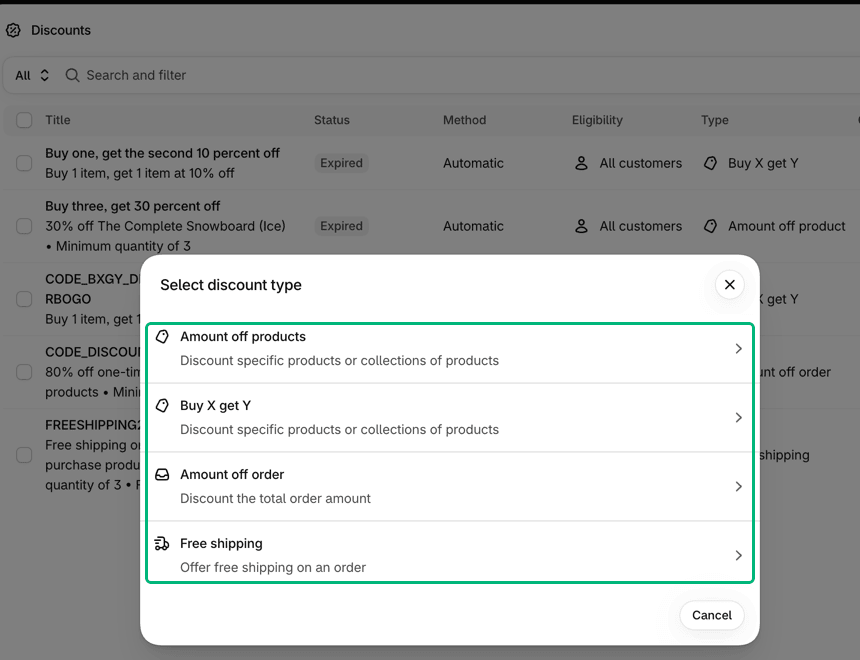
An app still makes sense when the built-in feature stops short, such as a discount type or a carrier the admin does not offer in your country. Start with the admin and add an app only for the gap. For the full list of search tasks, see our ecommerce SEO checklist.
How do you check an app before you install it?
Read the listing's pricing section, ratings, and recent reviews before you click Install. A few minutes on the listing saves you from surprise charges and slow pages.
Read the price line exactly. "Free" means free. "Free plan available" means the free plan has limits. "Free to install. Additional charges may apply" means you pay for usage, such as emails or ad spend.
Look at the number of ratings, not only the stars. A 5.0 from 10 ratings tells you less than a 4.6 from 5,000.
Read the most recent reviews. They show how the app works today and how fast the developer answers.
Know which results are paid. The Shopify Help Center says "Any time a developer pays Shopify to display their app to you, it's marked with a label that says Ad". You can't turn ads off.
Look for the Built for Shopify badge. Shopify says it "meets our highest standards for performance, design, and integration".
Install one app at a time and check your store's speed after each. Shopify's guide to improving store performance says too many apps loading assets on your storefront can slow performance. It also says uninstalling an app doesn't automatically remove its code from your theme. Note your conversion rate before each new app, and compare it with average conversion rates by industry to see where you stand.
Add up your whole Shopify bill
Apps are one line in your monthly Shopify costs. Our comparison of Shopify and WooCommerce lists Shopify's plan prices and payment fees from the official pages, so you can price the full setup before you install anything.
Frequently asked questions
How many apps does a new Shopify store need?
There is no fixed number, but most new stores can launch with four: email marketing, a signup form, product reviews, and chat. Add another app only when a job appears that the admin cannot do. Shopify's speed guide warns that too many apps loading assets on your storefront can slow performance, so install one at a time and remove what you stop using.
What are the best Shopify apps?
No single list fits every store, so start from the job, not from a ranking. For a new store, Shopify's free apps cover email, forms, chat, search, automation, translation, and bundles. Reviews need a third-party app. For each job, compare two or three listings on price, number of ratings, and recent reviews, and read the pricing section before you install.
Does Shopify have its own free reviews app?
No, not currently. On November 1, 2026, Shopify's Product Reviews listing said the app is not currently available on the Shopify App Store. For reviews, install a third-party app. The product reviews category listed 492 apps that day, and several have free plans, including Judge.me and Loox. Check what each free plan limits, such as the number of orders.
What happens when you uninstall a Shopify app?
The app stops working and its future recurring charges stop, but you might still be billed for the current billing cycle, according to the Shopify Help Center. Some third-party apps bill you outside Shopify, so those charges do not appear on your Shopify bill. Some apps also leave code in your theme that is not removed automatically, so check your theme or ask the developer afterward.
Amira Saad is a SaaS and AI product designer at Grovlix, where she works on the UX, UI and conversion rate optimization of PopupSnap, InstaFeed and PopAutomate. She writes about what makes online stores convert, from product pages to social proof.