



On this page
Read summarized version with
E-commerce key performance indicators (KPIs) are the dozen numbers that tell you whether your store is growing and why. Track net sales, average order value, revenue per session, conversion rate, add-to-cart rate and cart abandonment every week. Check returning customer rate, lifetime value, acquisition cost, gross margin, return rate and sell-through rate every month. Each KPI below has its formula, a dated benchmark where a reliable one exists, and the report that shows it.
The steps fit any platform. Shopify and WooCommerce get exact report names, taken from their official help pages as of November 1, 2026.
Ecommerce KPIs at a glance
The table gives the formula, the best public benchmark and where to find each KPI. Where no reliable benchmark exists, it says so, and the section on baselines explains what to do instead.
| KPI | Formula | Benchmark (publisher, year) | Shopify report | WooCommerce report |
|---|---|---|---|---|
| 1. Net sales | Gross sales - discounts - returns | No reliable public benchmark | Total sales over time | Analytics > Revenue |
| 2. Average order value (AOV) | Net sales / orders | Median $110, Shopify stores (Littledata, 2026) | Average order value over time | Analytics > Overview, Average order value indicator (switch on); Orders report chart |
| 3. Revenue per session | Revenue / sessions | Median $1.93, Shopify stores (Littledata, 2026) | Sessions by referrer, plus a sales report | Not in core Analytics: use Google Analytics 4 |
| 4. Conversion rate | Sessions with a purchase / sessions x 100 | Median 1.4%, Shopify stores (Littledata, 2026) | Conversion rate over time | Not in core Analytics: use Google Analytics 4 |
| 5. Add-to-cart rate | Sessions with a cart addition / sessions x 100 | Median 6.8%, Shopify stores (Littledata, 2026) | Conversion rate over time | Not in core Analytics: use Google Analytics 4 |
| 6. Cart abandonment rate | 1 - (sessions with a purchase / sessions with a cart addition) | 70.22%, average of 50 studies since 2006 (Baymard Institute, 2025); median 79%, Shopify stores (Littledata, 2026) | Conversion rate over time | Not in core Analytics: use Google Analytics 4 |
| 7. Returning customer rate | Returning customers / customers who ordered | No reliable public benchmark; Shopify's help center says most stores show 20-40% (2026) | New vs returning customers | Orders report, Customer type filter |
| 8. Customer lifetime value | Net sales from a customer group / customers in it, over a fixed window | No reliable public benchmark; 90-day revenue per customer median $142 (Littledata, 2026) | Customer cohort analysis | WooCommerce > Customers |
| 9. Customer acquisition cost (CAC) | Marketing spend / new customers | No reliable public benchmark | Performance by marketing channel | Not in core Analytics: use a spreadsheet |
| 10. Gross margin | (Net sales - cost of goods sold) / net sales x 100 | No reliable public benchmark for small stores | Gross profit by product | Cost of Goods extension reports |
| 11. Return rate | Value of returns / gross sales x 100 | 19.3% of online sales, large US retailers (NRF and Happy Returns, 2025) | Total sales over time (sales reversals) | Analytics > Revenue (Returns) |
| 12. Sell-through rate | Units sold / (units sold + units left in stock) x 100 | No reliable public benchmark | Products by sell-through rate | Analytics > Stock with the Products report |
Littledata's figures are medians of 433 to 436 Shopify stores that send data to Google Analytics 4, over the 90 days from July 27 to October 24, 2026. Small stores are not in the sample: each store needed at least 1,000 sessions and 90 purchases. Littledata measures purchase revenue from Google Analytics 4, which is not the same as Shopify's net sales, so expect small differences from your own reports.
12 ecommerce KPIs to track
The list runs in the order money moves: sales first, then the visitor funnel, then customers, then profit and stock. Items 1 to 6 change week to week. Items 7 to 12 move slowly, so a monthly check is enough.
1. Net sales
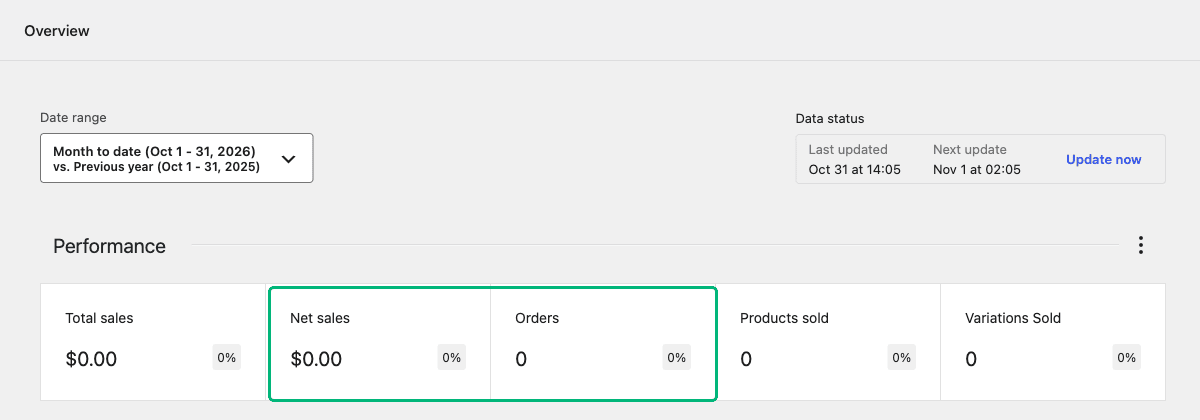
Net sales is the money you keep from orders after discounts and returns, before taxes and shipping. It is your main revenue number. Both platforms calculate it, with slightly different wording. Shopify defines it as gross sales minus discounts minus sales reversals. WooCommerce defines it as gross sales minus returns minus coupons.
Use net sales, not total sales, for trends. Total sales includes taxes and shipping, which move without any change in demand.
In Shopify, open Analytics > Reports and choose Total sales over time. In WooCommerce, go to Analytics > Revenue. No benchmark applies here, because your revenue only compares with your own past weeks.
2. Average order value
Average order value (AOV) is revenue divided by the number of orders in a period. Littledata's 2026 Shopify benchmark, which divides purchase revenue by orders, puts the median at $110. Industry matters more than the overall figure: the median was $211 for home and furniture stores (63 stores) and $69 for beauty and skincare (39 stores).
Net sales is roughly orders times AOV, so one of the two explains a change in sales. If sales fall while AOV holds, you got fewer orders. If AOV falls, look at discounts and product mix first.
Shopify has an Average order value over time report. In WooCommerce, the Performance section of Analytics > Overview does not show it by default. Switch on the Average order value indicator from the section's menu, which links to the Average Order Value chart in the Orders report. WooCommerce calculates it as net sales divided by orders. Shopify's version uses gross sales minus discounts, so the two will not match exactly on a store with many returns.
3. Revenue per session
Revenue per session is your revenue divided by the number of sessions. It combines conversion rate and AOV into one figure, which makes it a fair way to compare traffic sources. Littledata's 2026 benchmark, which divides purchase revenue by all sessions, puts the Shopify median at $1.93 per session.
Split it by channel: a channel with fewer visits can earn more per visit.
In Shopify, Sessions over time and Sessions by referrer give the visits, and a sales report gives the revenue for the same dates. WooCommerce Analytics does not count visits. Connect Google Analytics 4 with the Google Analytics for WooCommerce extension, under WooCommerce > Settings > Integration > Google Analytics.
4. Conversion rate
Conversion rate is the share of sessions that end in a purchase: sessions with a purchase, divided by all sessions, times 100. Littledata's 2026 benchmark puts the Shopify median at 1.4%, and the top 20% of stores above 2.7%. Our guide to the average e-commerce conversion rate breaks this down by industry and device.
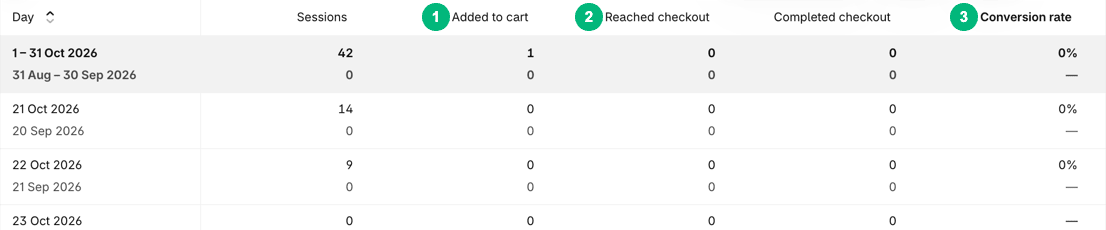
In Shopify, the Conversion rate over time report shows it next to the session counts behind it. Shopify changed how it measures sessions between September 21 and 23, 2026. Compare weeks from after that update with each other, not with older weeks.
Shopify's analytics fields reference says it counts a session only when the visitor accepts cookies through your cookie banner. On a WooCommerce store, read conversion rate in Google Analytics 4, connected as in item 3.
5. Add-to-cart rate
Add-to-cart rate is the share of sessions in which a visitor added a product to the cart. It tells you whether product pages persuade, separate from whether checkout works. Littledata's 2026 Shopify median is 6.8%, with the top 20% of stores above 12%.
A low add-to-cart rate with a normal checkout completion rate points at the product page. Check the photos, the price, the delivery estimate and the description. These product description examples show what to write for different product types.
In Shopify, the Sessions with cart additions column of Conversion rate over time gives the count. Divide it by sessions. On WooCommerce, the Google Analytics for WooCommerce extension tracks add-to-cart events for GA4.
6. Cart abandonment rate
Cart abandonment rate is the share of carts that do not become orders. Measured by sessions, it is one minus sessions with a purchase divided by sessions with a cart addition. Baymard Institute's average of 50 published studies, some dating back to 2006, is 70.22% (updated September 2025). Littledata's 2026 median for Shopify stores is 79%.
The two figures differ because they measure different things. Baymard averages published studies, while Littledata counts sessions in one tracking setup. Compare your rate only with a figure measured the same way.
Of Shopify sessions that started checkout, Littledata's median store converted 49%. In Shopify, use the cart and checkout columns in Conversion rate over time, and the Abandoned checkouts list under Orders > Abandoned checkouts. On WooCommerce, use the checkout and purchase events in GA4.
7. Returning customer rate
Returning customer rate is the share of customers in a period who had ordered before. Shopify calculates it as returning customers divided by all customers who placed orders. Shopify's help center notes that most stores show 20-40%, but the note gives no sample or method, so treat that range as rough.
A rising rate means customers come back without paid ads. The rate also falls when you win many new customers at once, so read it next to the count of new customers.
Shopify has New vs returning customers and Returning customers reports. In WooCommerce, open the Orders report under Analytics and add the Customer Type filter to see orders from returning customers.
8. Customer lifetime value
Customer lifetime value (CLV) is the revenue a customer brings over their whole relationship with your store. For a small store, measure it over a fixed window, such as 12 months. Divide net sales from customers who first bought in one month by the number of those customers.
There is no reliable public benchmark for CLV, because it depends on how often your product is bought again. Littledata's 2026 figure for revenue per customer over 90 days, a much shorter window, has a Shopify median of $142.
Shopify's Customer cohort analysis report groups customers into cohorts by the date of their first order. In WooCommerce, the summary under WooCommerce > Customers shows average lifetime spend and average orders per customer.
9. Customer acquisition cost
Customer acquisition cost (CAC) is your marketing spend in a period divided by the new customers you won in it. Include ad spend, influencer fees and discounts given only to first-time customers. There is no reliable public benchmark for CAC, because it depends on your channel, price and margin.
Compare CAC with the gross profit on a first order, then with lifetime value. Return on ad spend (ROAS), revenue divided by ad spend, is the per-campaign version.
Shopify's Performance by marketing channel report lists ad spend, ROAS and CAC. It shows them only for channels that report cost data to Shopify, such as a connected ad platform. WooCommerce Analytics has no spend data, so keep a sheet with spend per channel and new customers from the Customers report.
10. Gross margin
Gross margin is the share of net sales left after the cost of the goods you sold: net sales minus cost of goods sold, divided by net sales. It tells you whether growth makes money. A store can raise sales and lose margin at the same time through discounts.
There is no reliable public benchmark for small online stores. For reference, Aswath Damodaran's January 2026 data for listed US retailers shows gross margins from 21.96% (automotive) to 35.30% (specialty retail). Those are large public companies, not small stores. To check the margin on one product after shipping and payment fees, use the free profit margin calculator.
Shopify's Gross profit by product report needs a cost per item on each product and variant. WooCommerce core has no cost field. The Cost of Goods extension adds one, plus profit reports under Analytics. Before any sale, check the margin math behind promotional pricing.
11. Return rate
Return rate is the value of goods refunded divided by gross sales, times 100. Measure it by value, and by product, because one product with many returns can hide inside a normal store-wide rate. The National Retail Federation (NRF) and Happy Returns estimated in their 2025 returns report that 19.3% of online sales would be returned. The report's merchant survey covered 358 e-commerce professionals at large US merchants, so a small store may sit far from that figure.
In WooCommerce, Analytics > Revenue shows Returns next to gross sales. Shopify's sales reports call refunded sales revenue Sales reversals, and its help center marks the old Returns term as deprecated, so look for sales reversals in Shopify. Shopify's analytics fields also include a reversed quantity rate: returned items divided by items sold.
12. Sell-through rate
Sell-through rate is the share of available stock you sold in a period: units sold, divided by units sold plus units left in stock. Shopify uses this exact formula. A low rate means cash sits on shelves, and a very high one warns of a stockout. There is no reliable public benchmark, because it depends on how often you restock.
Shopify has a Products by sell-through rate report under inventory reports. In WooCommerce, Analytics > Stock gives units left in stock and the Products report gives items sold, so you combine the two in a sheet.
How do you run a weekly KPI review?
Pick one day, export the same reports, and compare each number with the last four weeks before you compare it with any benchmark. Keep one row per week and one column per KPI.
- Fill in items 1 to 6 every week, for the week that just ended.
- Fill in items 7 to 12 once a month.
- Mark any KPI that moved more than its usual week-to-week range.
- For each marked KPI, write one likely cause and one change to test.
- Change one thing at a time, so next week's numbers tell you which change worked.
Use the same date type every time. WooCommerce reports orders by paid date by default, and its settings exclude pending, failed and canceled orders. Those choices live under Analytics > Settings. These numbers feed the plan in our guide to e-commerce growth strategy.
How do you set a baseline when no benchmark exists?
Use your own last 8 to 12 weeks as the baseline. Take the median week, not the average, so one big sale week does not set an unrealistic target. Then set a target a little above it.
For example, if your median weekly gross margin over 12 weeks is 41%, set a target of 42% to 43%. Review it after a quarter. This is a worked example, not a benchmark.
Rebuild the baseline after any big change: a new platform, a new tracking setup, a price change or a new main ad channel. Numbers from before and after such a change measure different things, so they cannot share one baseline.
Check your conversion rate against stores like yours
Conversion rate is the KPI stores compare most often, and its benchmarks vary widely by industry and device. Our breakdown of the average e-commerce conversion rate by industry and device shows which figures compare with yours and which do not.
Frequently asked questions
What is the difference between a KPI and a metric?
A KPI is a metric you have chosen to steer the business by, with a target and an owner. Every KPI is a metric, but most metrics are not KPIs. Sessions, page views and bounce rate are metrics. Conversion rate becomes a KPI when you set a target for it, check it on a fixed day and act when it moves.
Which KPIs should a new online store track first?
Start with four: net sales, orders, conversion rate and average order value. Together they show why revenue moved, and every platform reports them. Add gross margin as soon as you enter product costs, so you can tell whether sales make money. Leave lifetime value and cohort reports until you have a few months of repeat orders.
Can you track e-commerce KPIs without Google Analytics?
Partly. Shopify counts sessions itself, so its reports cover conversion rate and cart additions without Google Analytics. WooCommerce Analytics reports orders, revenue, customers and stock, but not visits. On a WooCommerce store, any KPI that divides by sessions needs a visit tracker, such as Google Analytics 4 through the Google Analytics for WooCommerce extension.
What is a good customer acquisition cost?
A good customer acquisition cost is one that your gross profit from that customer pays back, and no public benchmark sets one figure for all stores. Work out the gross profit on a typical first order. If CAC is below it, the first order pays for the customer. If it is higher, you need repeat orders to cover it.
Amira Saad is a SaaS and AI product designer at Grovlix, where she works on the UX, UI and conversion rate optimization of PopupSnap, InstaFeed and PopAutomate. She writes about what makes online stores convert, from product pages to social proof.